Edit Profile
Overview
Lets an agent view and update their own profile information.
Navigate to: Home → More → Edit Profile
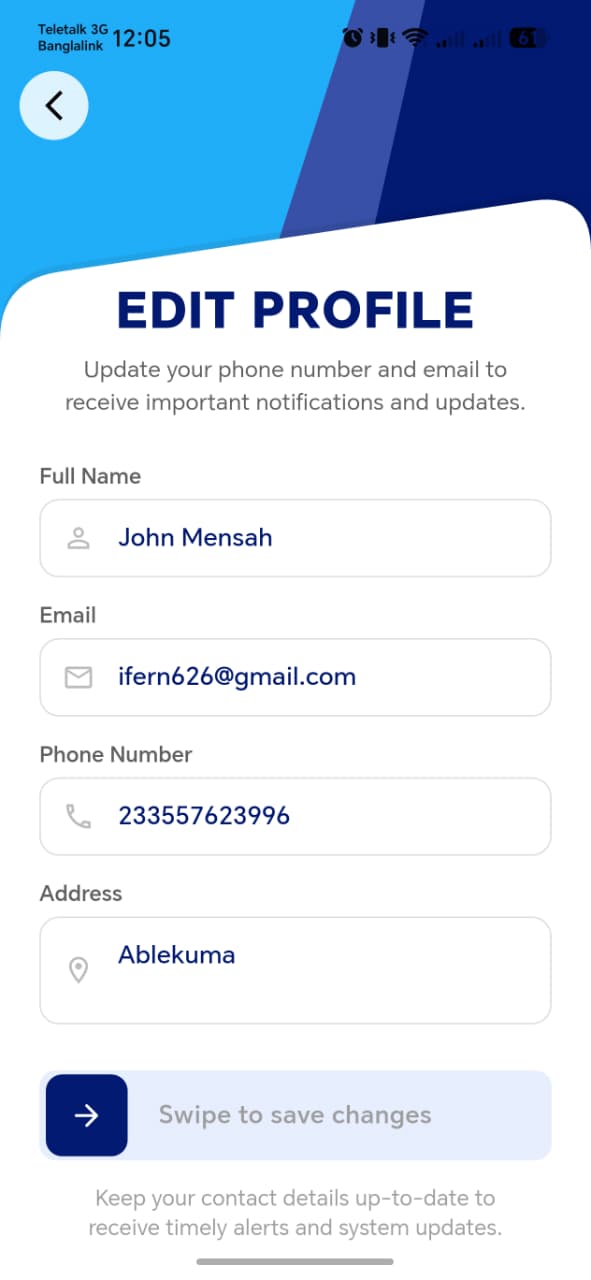
The functional spec doesn't itemize the exact fields on this screen — based on the equivalent Owner App flow, it likely covers name, date of birth, gender, and ID details, but this needs confirming once the screenshot is in place.
!!! note "Needs confirmation from screenshot" - Whether this covers identity fields only (name, DOB, gender, ID) or also contact fields (phone, email) and address, the way the Owner App splits these into separate edit screens - Whether changing a verified field (e.g. ID Number, phone) here re-triggers OTP/verification, consistent with how Add Rate Payer handles verification - Whether Agent ID / assigned blocks are shown here as read-only reference info, or live elsewhere
!!! tip "Things to check" - Required fields block Save when cleared - Changes made here are reflected immediately on the Dashboard header (agent name) and anywhere else the agent's identity is displayed - If phone/email can be changed here, confirm whether that affects the agent's login credentials going forward