Profile & Settings
Overview
Covers the More menu and everything reachable from it: profile details, identity/address editing, activity reports, password change, and app info.
Navigate to: Home → More (bottom navigation)
More Menu
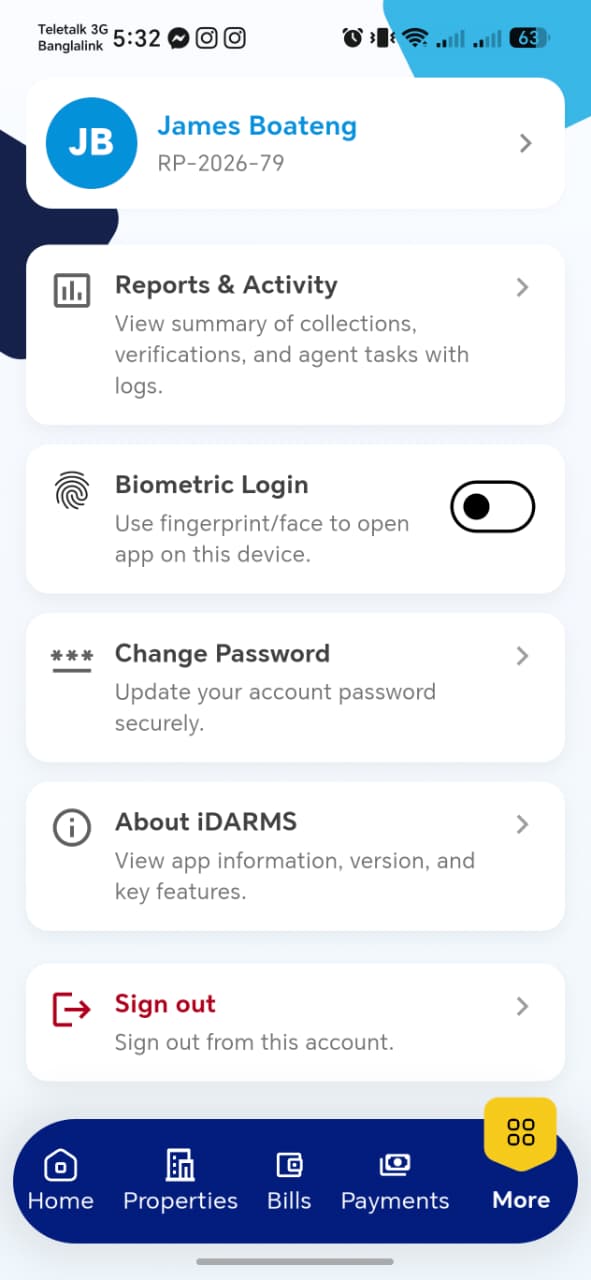
| Item | Description |
|---|---|
| Profile card | Avatar, name, and Rate Payer ID — tapping opens My Profile |
| Reports & Activity | Summary of collections, verifications, and agent tasks — see Reports & Activity |
| Biometric Login | Toggle to use fingerprint/face unlock for the app on this device |
| Change Password | See Change Password |
| About iDARMS | See About iDARMS |
| Sign out | Signs out of the current account |
!!! tip "Things to check" - Biometric Login toggle actually enables/disables device biometric prompt on next app open — not just a cosmetic switch - Sign out clears the session fully (re-opening the app requires login again, no stale cached data)
My Profile
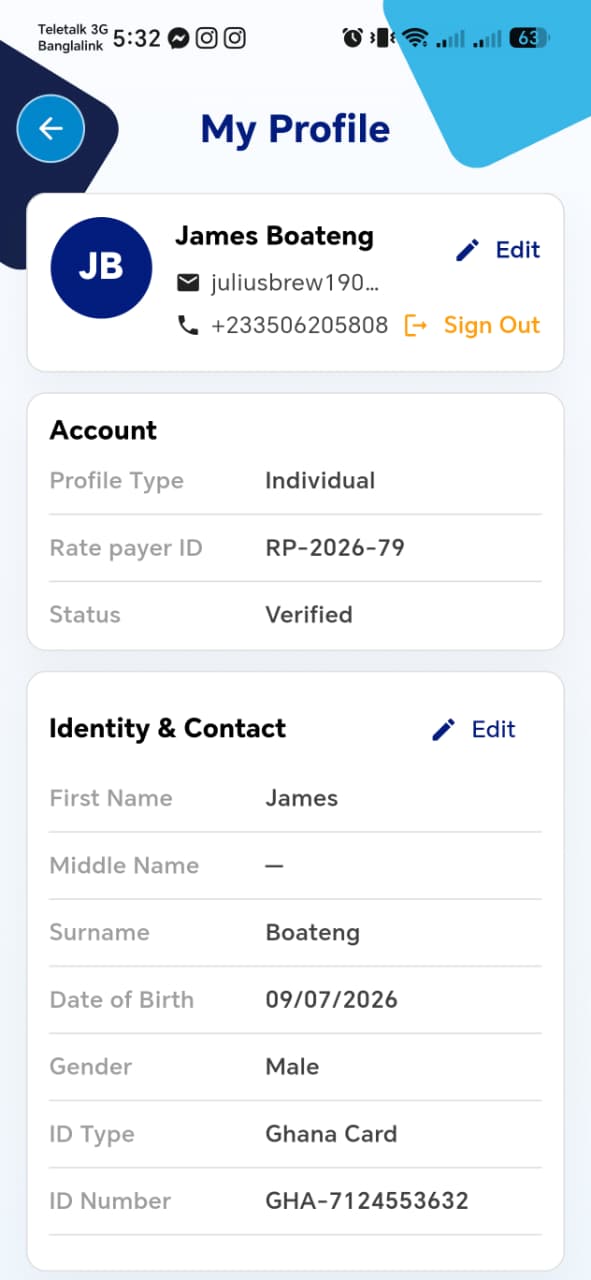
| Section | Fields |
|---|---|
| Header | Name, Email, Phone, with Edit (opens Update Contact Details) and Sign Out |
| Account | Profile Type (e.g. Individual), Rate Payer ID, Status (e.g. Verified) |
| Identity & Contact | First Name, Middle Name, Surname, Date of Birth, Gender, ID Type, ID Number, with its own Edit (opens Edit Identity & Contact) |
!!! tip "Things to check" - Account section (Profile Type, Rate Payer ID, Status) is read-only — confirm there's no way to edit these here - Address details aren't shown on this main profile screen — confirm Edit Individual Address is reachable some other way (e.g. scrolling further, or a separate entry point not captured in these screenshots)
Update Contact Details
Opened via the header Edit link.
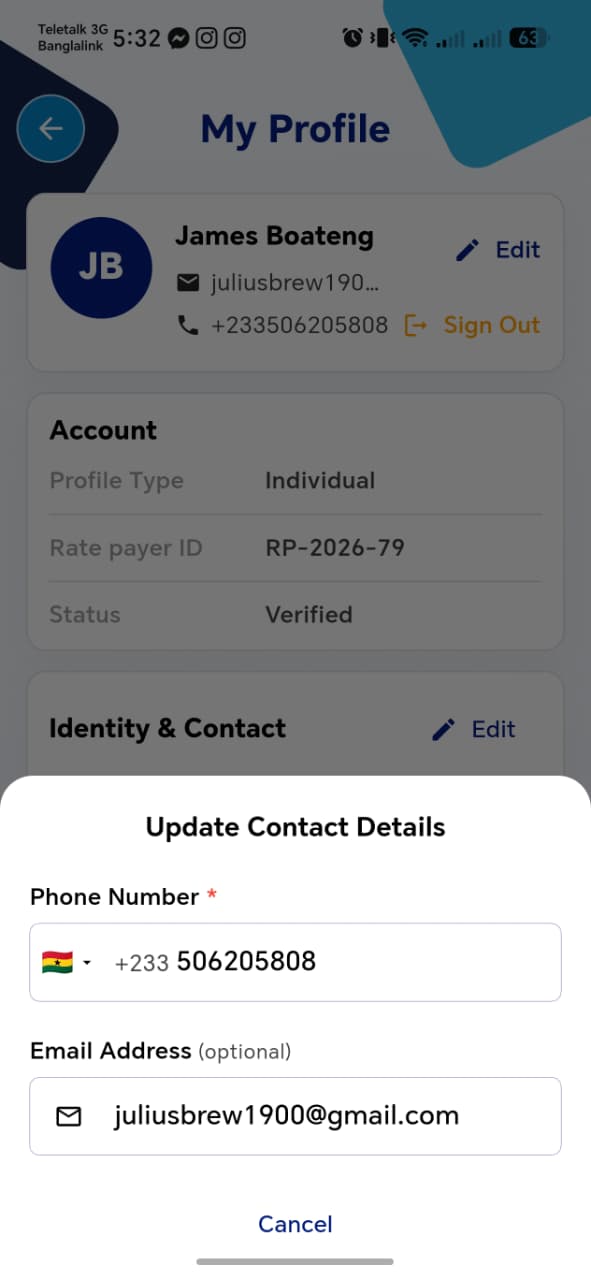
| Field | Required | Notes |
|---|---|---|
| Phone Number | Yes | Country code selector + number |
| Email Address | No |
!!! tip "Things to check" - Changing the phone number here — does it require OTP re-verification, given it's tied to login and to the Pay for Others OTP flow? - Cancel discards changes; confirm there's a working Save/confirm action (not visible in this screenshot — may be below the fold)
Edit Identity & Contact
Opened via the Identity & Contact section's Edit link.
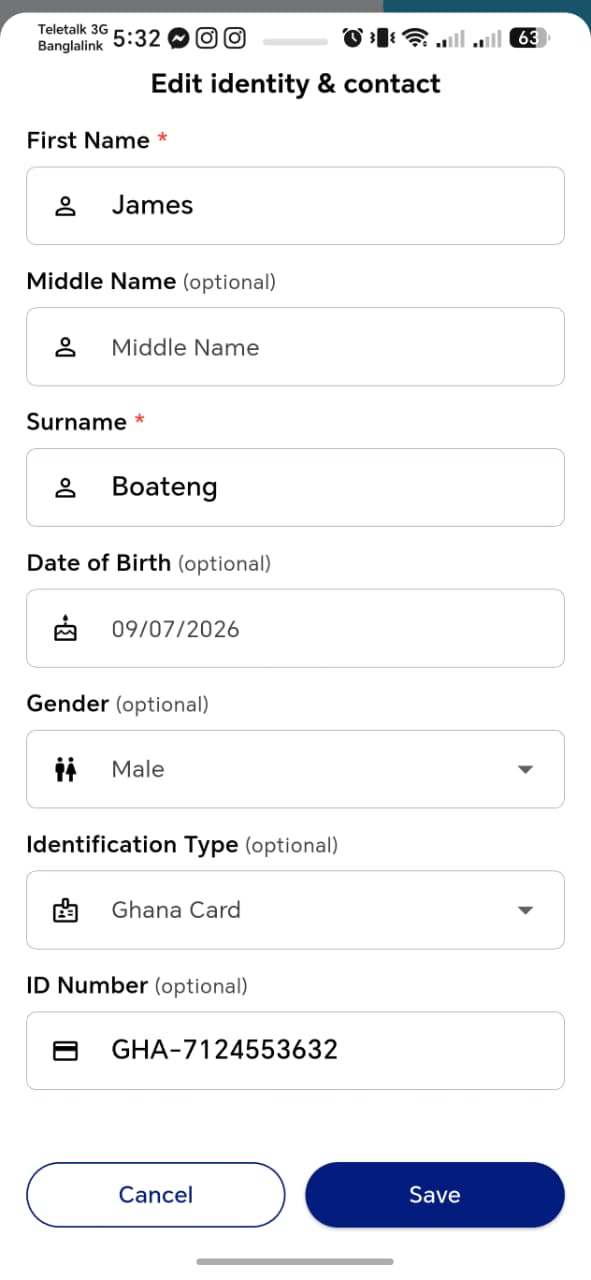
| Field | Required | Notes |
|---|---|---|
| First Name | Yes | |
| Middle Name | No | |
| Surname | Yes | |
| Date of Birth | No | Date picker |
| Gender | No | Dropdown |
| Identification Type | Yes | Dropdown, e.g. Ghana Card |
| ID Number | No |
Cancel / Save at the bottom.
!!! tip "Things to check" - Changing ID Type or ID Number here — does it re-trigger a verification step, or silently update a previously verified identity? - Required fields (First Name, Surname) block Save if cleared
Edit Individual Address

Two sections, each with the same field set: Present Address and Permanent Address. A Same as present checkbox on Permanent Address presumably copies the Present Address values across.
| Field | Required | Notes |
|---|---|---|
| Full Address | Yes | |
| Digital Address | Yes | e.g. GA053 |
| Region | Yes | Dropdown |
| District | Yes | Dropdown |
| House / Plot Number | No | |
| Landmark | No | |
| Town / Locality | No | |
| Community / Village | No | |
| Electoral Area | No | |
| Traditional Authority | No | |
| Postal Address | No |
Cancel / Save at the bottom.
!!! tip "Things to check" - Same as present actually copies all Present Address values into Permanent Address, and unchecking it doesn't wipe the Permanent fields - District options correctly filter based on the selected Region, consistent with Add Property → Location & GIS - Confirm how this screen is reached from My Profile — it wasn't visible in that screenshot, so it may need its own entry point or a scroll-down section