Payment History
Overview
Covers the My Payments list and the detail view for a single past payment.
Navigate to: Home → Payments (bottom navigation), or See History from
the dashboard's Total Paid card.
My Payments
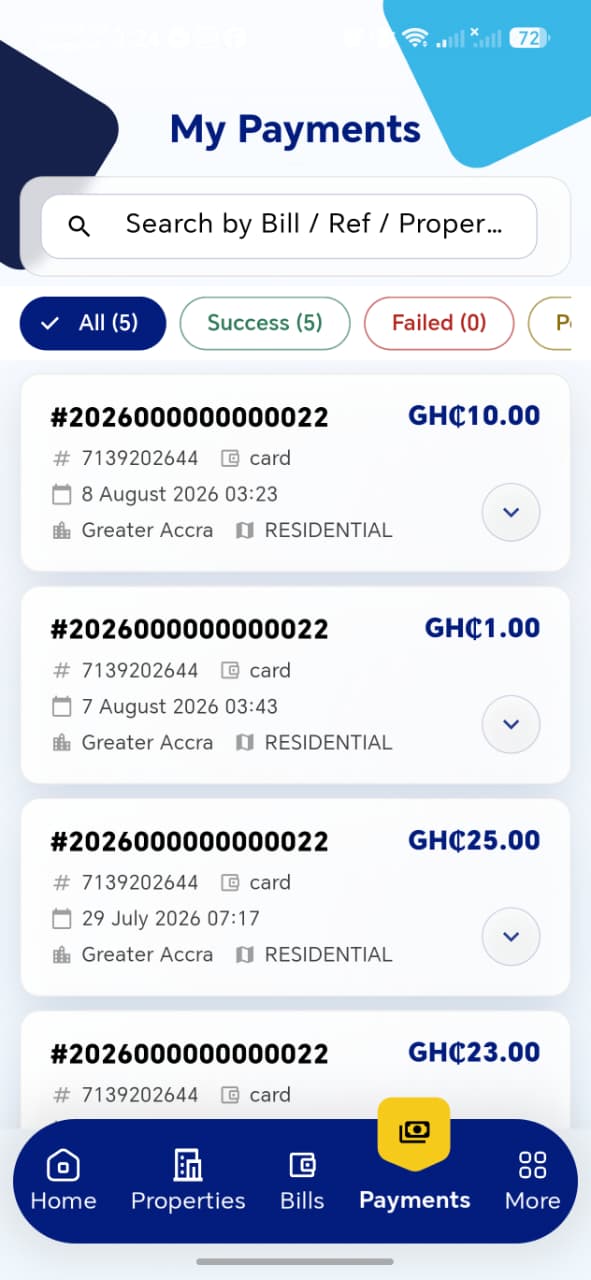
| Element | Description |
|---|---|
| Search bar | Search by Bill / Reference / Property |
| Filter tabs | All (N), Success (N), Failed (N), and at least one more tab off-screen (likely Pending) — each shows a live count |
Payment Card
| Field | Description |
|---|---|
| Bill Number | e.g. #2026000000000022 |
| Property ID | e.g. #7139202644 |
| Payment Method | e.g. card, shown with an icon |
| Date/Time | e.g. 8 August 2026 03:23 |
| Region | e.g. Greater Accra |
| Property Type | e.g. RESIDENTIAL |
| Amount | Amount paid in that transaction |
Multiple payments can exist against the same Bill Number (partial/installment payments) — the list correctly shows each as a separate entry. Tapping the chevron on a card opens Payment Details.
!!! tip "Things to check"
- Filter tab counts (All, Success, Failed, ...) match the actual number of matching entries
- Multiple partial payments against the same bill each appear as distinct entries, not merged or overwritten
- Search correctly matches by Bill Number, Reference, or Property ID
- List is sorted by most recent payment first
Payment Details

Same layout as the Payment Success screen — just reached from history instead of immediately after paying.
| Field | Description |
|---|---|
| Amount | |
| Bill Number | |
| Reference No | |
| Ratepayer | |
| Payment Method | |
| Paid On | |
| Description |
Actions: View / Print Receipt, Share Link, Browser — same as on the Payment Success screen, opening the same Official Payment Receipt.
!!! tip "Things to check" - Every field here matches exactly what was shown at the time of payment — nothing should change retroactively - Opening the receipt from history produces the identical receipt as the one generated right after payment (same Receipt Number, QR code, etc.)