Property List & Details
Overview
The Properties screen lists all properties registered by the agent, with filtering by ownership type and search by phone number. Tapping any property opens its full detail page.
Navigate to: Bottom Navigation → Properties
Property List
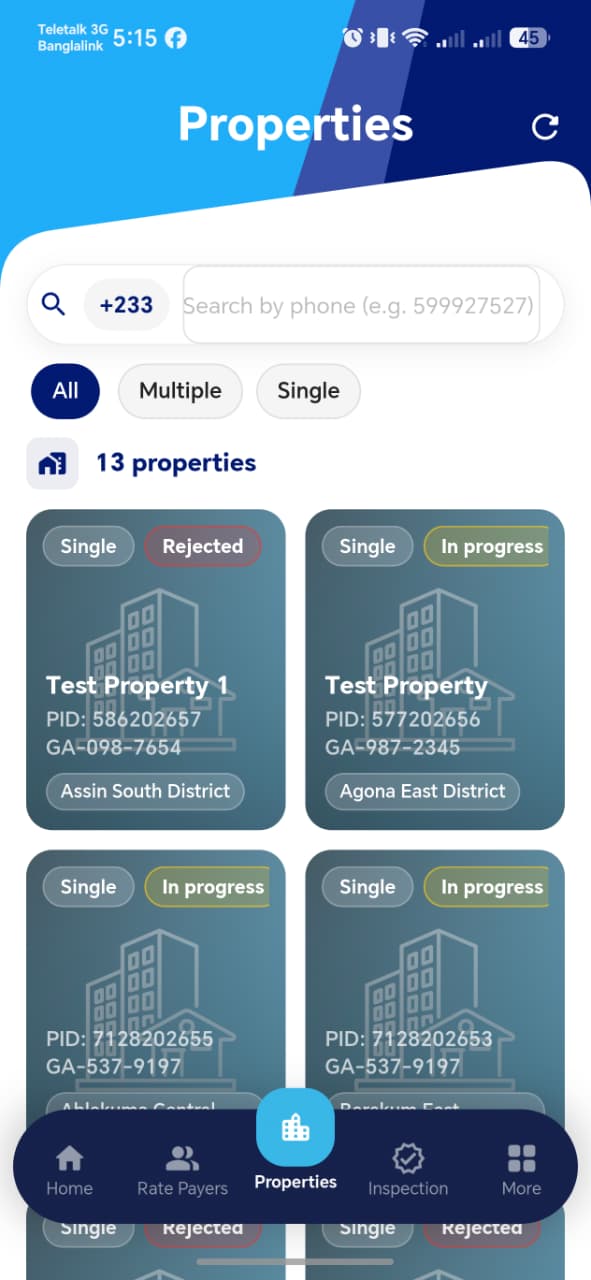
List Features
| Element | Description |
|---|---|
| Refresh (↺) | Top right — reloads the property list |
| Search bar | Search by rate payer phone number (e.g. +233 599927527) |
| All / Multiple / Single tabs | Filter properties by ownership type |
| Property count | Shows total number of properties (e.g. 12 properties) |
| Property card | Shows property name, PID, digital address, MMDA, ownership type, and status badge |
Ownership Type Filter
| Tab | Shows |
|---|---|
| All | Every property regardless of ownership type |
| Multiple | Properties with joint or multiple ownership |
| Single | Properties with single ownership |
Property Card
Each card in the grid shows:
| Element | Description |
|---|---|
| Ownership badge | Single or Multiple (top left of card) |
| Status badge | Current inspection/registration status (top right) |
| Property name | Display name if set (e.g. Test Property) or blank |
| PID | Unique Property ID assigned by the system (e.g. PID: 577202656) |
| Digital Address | Ghana Post address (e.g. GA-987-2345) |
| MMDA | District/Municipal area (e.g. Agona East District) |
Property Status Badges
| Badge | Colour | Meaning |
|---|---|---|
In progress |
Yellow/Gold | Property is currently under inspection |
Pending |
Grey | Registered but inspection not yet started |
Rejected |
Red | Inspection was rejected |
Approved |
Green | Inspection completed and approved |
Property Details Page
Tapping a property card opens the full details page.
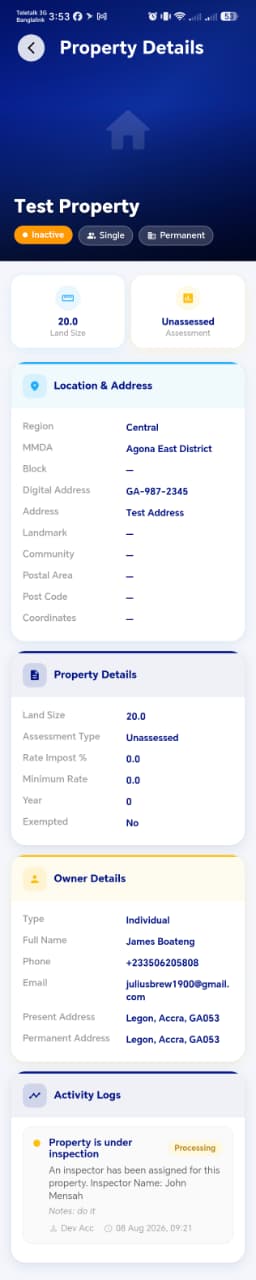
Header
| Element | Description |
|---|---|
| Property icon | Large house icon at the top |
| Property Name | e.g. Test Property |
| Status badge | e.g. Inactive, Active |
| Ownership badge | e.g. Single |
| Structure badge | e.g. Permanent |
Summary Tiles
Two summary tiles sit below the header badges:
| Tile | Description |
|---|---|
| Land Size | Size of the property in square metres (e.g. 20.0) |
| Assessment | Assessment status (e.g. Unassessed) |
Location & Address Section
| Field | Description |
|---|---|
| Region | e.g. Central |
| MMDA | e.g. Agona East District |
| Block | Block number if assigned, otherwise — |
| Digital Address | e.g. GA-987-2345 |
| Address | Full physical address (e.g. Test Address) |
| Landmark | Nearby landmark, or — if not set |
| Community | Community name, or — |
| Postal Area | Postal area, or — |
| Post Code | Postal code, or — |
| Coordinates | GPS coordinates, or — if not captured |
Property Details Section
| Field | Description |
|---|---|
| Land Size | Size in square metres |
| Assessment Type | e.g. Unassessed |
| Rate Impost % | Applicable rate percentage |
| Minimum Rate | Minimum rate payable |
| Year | Assessment year |
| Exempted | Whether the property is tax-exempted (Yes / No) |
Owner Details Section
| Field | Description |
|---|---|
| Type | Individual or Organisation |
| Full Name | Rate payer's full name (e.g. James Boateng) |
| Phone | Contact number (e.g. +233506205808) |
| Email address | |
| Present Address | Current residential address |
| Permanent Address | Permanent residential address |
Activity Logs Section
Shows a chronological log of all activity related to this property.
| Element | Description |
|---|---|
| Status dot | Colour-coded dot indicating the type of activity |
| Activity description | e.g. Property is under inspection |
| Tag | e.g. Processing |
| Detail message | e.g. An inspector has been assigned for this property. Inspector Name: John Mensah |
| Notes | Any notes added during the activity |
| Author & timestamp | Who performed the action and when (e.g. Dev Acc · 08 Aug 2026, 09:21) |
!!! info "Activity Log is Read-Only" The Activity Logs section is a permanent audit trail. It cannot be edited or deleted by the agent.
Test Suggestions
!!! tip "Filter Test" Tap Single tab — verify only single-ownership properties appear. Tap Multiple — verify only multi-ownership properties appear. Tap All — verify all properties are shown again.
!!! tip "Search Test" Search by a rate payer's phone number. Verify only properties linked to that rate payer appear.
!!! tip "Status Badge Test"
Identify properties with different statuses (In progress, Pending,
Rejected). Verify each badge displays the correct colour and label.
!!! tip "Detail Accuracy Test" Register a new property with known values. Open its detail page and verify all fields (Digital Address, Region, MMDA, Owner Name, Land Size) match what was entered.
!!! tip "Activity Log Test" After an inspector is assigned to a property, open that property's detail page and verify the activity log shows the assignment entry with the correct inspector name and timestamp.
!!! tip "Owner Details Test" Open a property detail page and verify the Owner Details section shows the correct rate payer name, phone, email, and addresses matching their registered profile.